
Your event just wrapped. The photographer nailed it. 2,000 photos are live in the gallery. And your attendees are doing the same thing they always do.
They’re scrolling. And scrolling. And giving up.
Finding yourself in a gallery of thousands isn’t a photo problem. It’s a search problem. And most event platforms haven’t solved it.
It’s not that your guests don’t care. It’s that hunting for your own face across hundreds of images is genuinely exhausting — so most people quit after the first minute. They never find the shot of them crossing the finish line, or laughing with a colleague at the after-party, or on stage accepting an award.
They don’t share it. They don’t post it. The organic buzz you were counting on simply never happens.

The Real Cost of a Gallery No One Can Navigate
Think about what’s actually at stake when your guests can’t find their photos.
That conference attendee who had a breakthrough conversation on day two? There’s a photo of that moment. But they’ll never find it buried on page 23 of a grid view. So they don’t post about your event. They don’t tag your brand. They move on with their week.
Every photo your guests don’t find is a social post that never happens, a memory that never gets shared, and a piece of organic reach you spent real money creating — that silently disappears.
You don’t need a bigger gallery. You don’t need a better photographer. You need people to actually find their photos. Instantly. Without friction. Without apps. Without asking anyone for help.
That’s exactly what Qrati is built to do.
Meet Qrati’s Search System — Multiple Ways to Find Anyone, Instantly
Most photo platforms offer one search: a scrollable grid. Maybe a date filter if you’re lucky. Qrati is different. There are four distinct ways to find anyone in your event gallery — and all of them are fast, and all of them are free.
Upload any photo and find every image featuring that face — instantly, from any device
Upload a group photo and find every photo of every person in it, individually and together
Tap any gallery tile to instantly filter the entire gallery by the faces in that photo
Type names, moments, or themes — Qrati searches across photo descriptions and captions
Let’s go through each one.
1. AI Face Search — Upload a Photo, Find Yourself in Seconds
This is the one guests reach for first. In the Qrati gallery toolbar, there’s a button that simply says “Search using image.” Tap it. Select any photo from your camera roll — a selfie, your LinkedIn headshot, a photo from a previous event, literally anything with your face in it. Hit search.
Within seconds, the entire gallery re-filters to show only the photos where you appear. Candids, group shots, stage moments, hallway conversations — if you’re in it, it shows up.
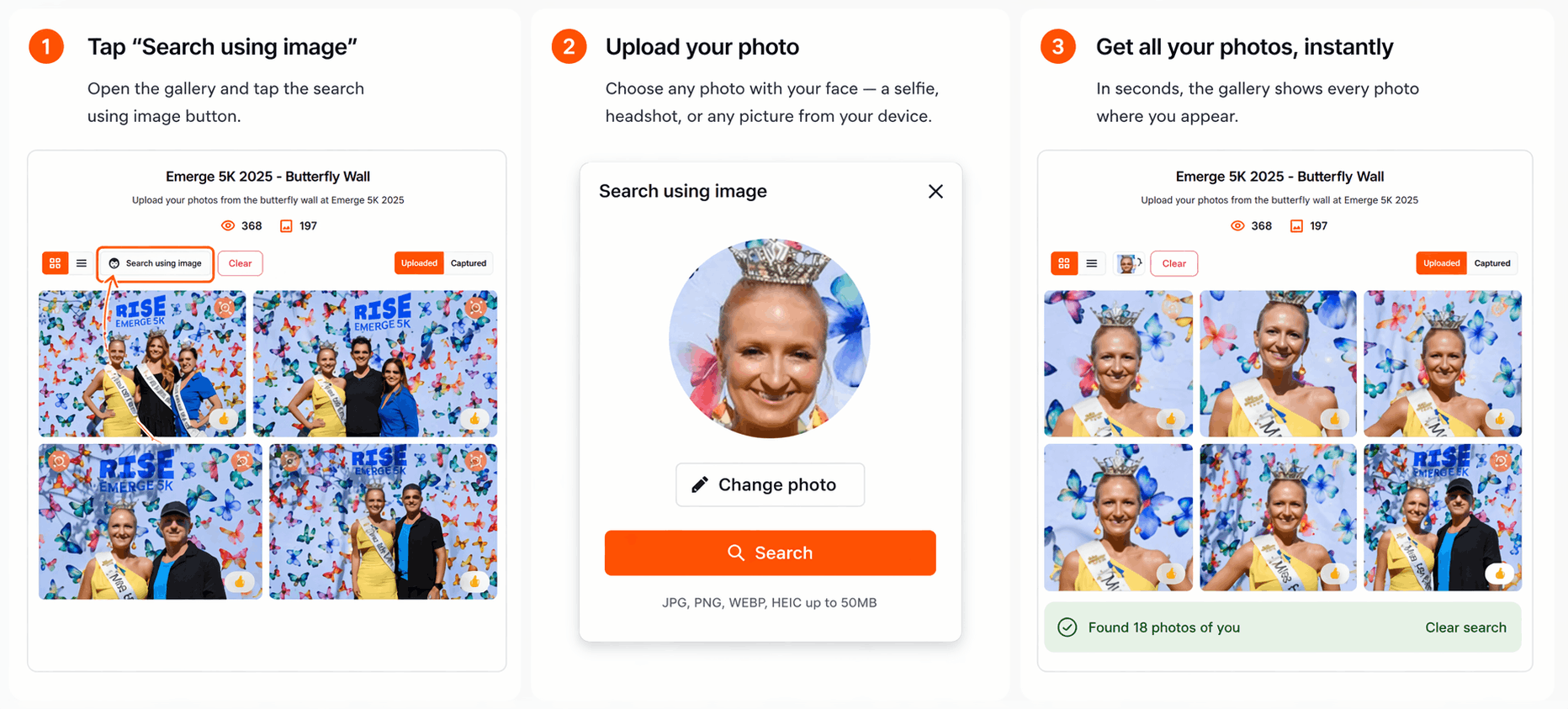
No special registration photo taken at check-in. No badge scanning. No app to download. No account required. Guests bring the query image in their pocket — the same phone they’ve had all day.
JPG, PNG, WEBP, HEIC, TIFF, BMP — whatever comes off your iPhone, Android, or camera roll, Qrati handles it. And if the photo is large? It auto-compresses on your device before sending anything to the server, so even a full-resolution burst photo uploads instantly. Your attendees never see any of this happening. They just see: fast results.
2. Group Face Search — One Photo, Every Person in It
Here’s where Qrati does something other platforms don’t. Most face search tools find one person. You upload a selfie, you get your photos. That’s fine — but it doesn’t solve the room. Now you can find your entire group with just one search.
What if you could upload one photo of your whole table and find every photo of every person at it — all at once?
Qrati’s group search does exactly that. When you upload an image containing multiple faces, Qrati detects every face in that image and runs simultaneous searches across the entire gallery for all of them. The results include any photo where any of those people appear — whether they’re all together or scattered individually across the event.
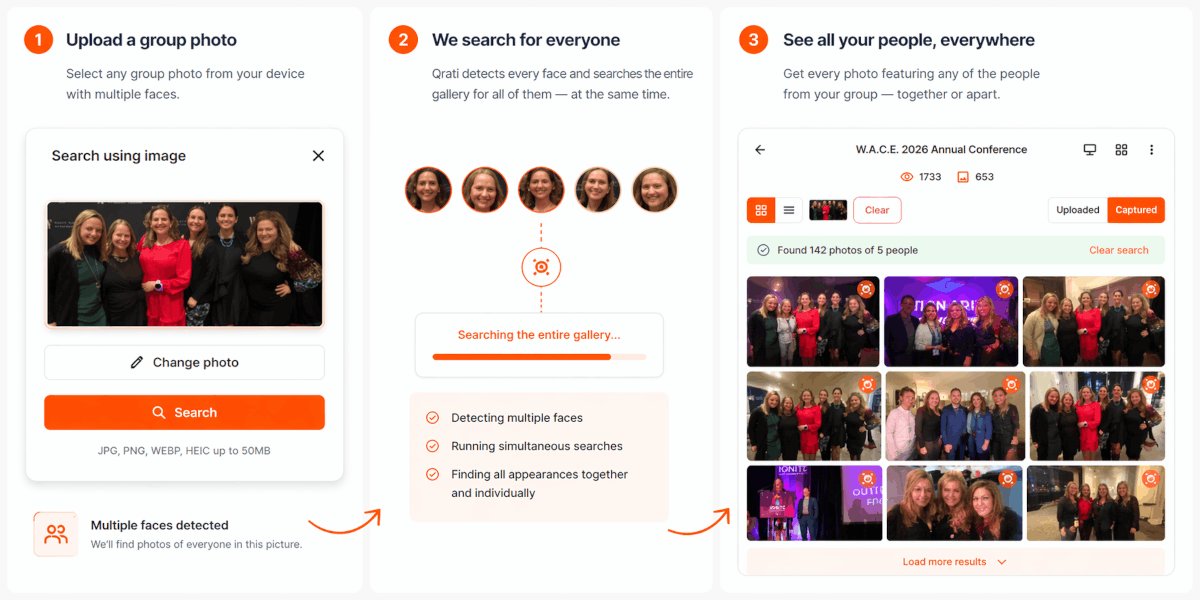
An attendee at your annual sales kickoff uploads the group photo their team took at the opening dinner. Qrati returns every photo from the entire event featuring any of those eight people — whether they’re on the main stage, at the breakout session, or captured in a spontaneous hallway moment. One search. Eight people’s complete event journey, surfaced in seconds.
3. One-Tap Tile Search — See Someone, Find Them Everywhere
You’re browsing the gallery and a photo catches your eye. A great candid of your keynote speaker mid-laugh. You want to see every photo of them from the day — but you don’t want to download the image, go back to the search bar, and upload it as a query. That’s three steps too many.
So Qrati doesn’t make you do that. On any photo in the gallery that contains detected faces, a small face-search icon appears in the corner of the tile when you hover over it. One tap. The entire gallery instantly re-filters to show every photo featuring the faces detected in that image.
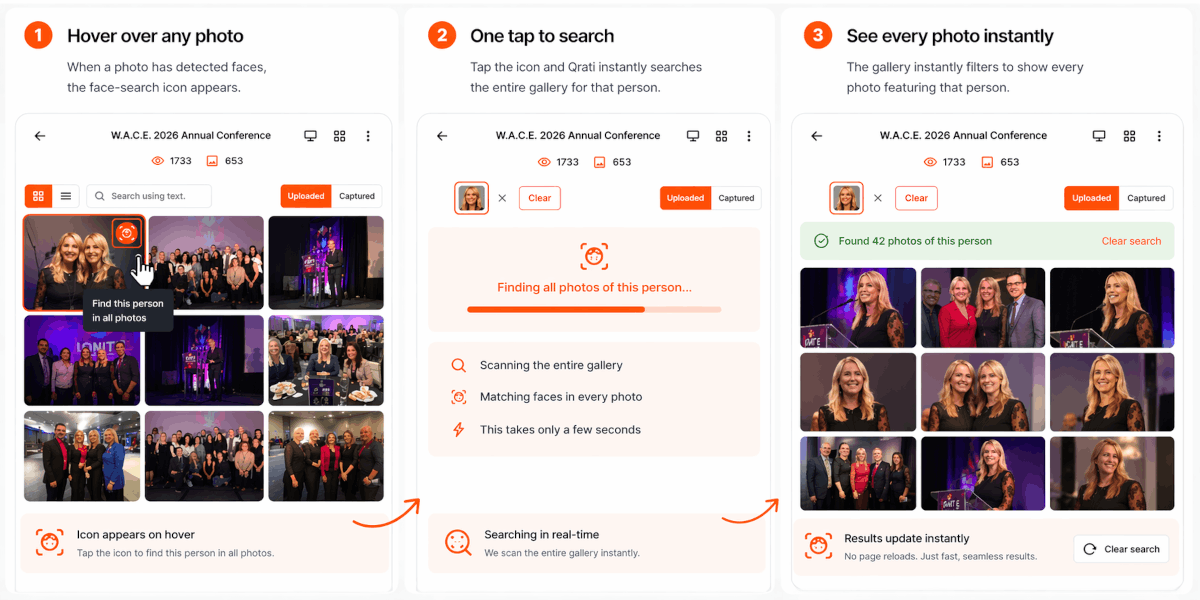
No uploading, no extra steps — the icon is right on the tile.
The gallery updates in place — no new page load, no waiting.
Clear the search and you’re back to the full gallery in a tap.
It’s the fastest path from “I see that person” to “here’s every photo of them.” No friction, no workflow, no instructions required.
4. Text & Keyword Search — When You Know What You’re Looking For
Faces aren’t the only way to find what matters. Qrati’s gallery includes a text search box — the one that says “Search using text” — and it’s more capable than it looks.
Type a name and Qrati surfaces photos uploaded by that person. Type a keyword — a topic, a moment, a session name — and Qrati searches across AI-generated photo descriptions and captions to find matching content. It’s the kind of search that answers questions like:
- “Show me photos from the panel session on day two”
- “Find photos where the awards were being presented”
- “Where are the photos from the rooftop networking reception?”
- “Find anything with the product demo setup in it”
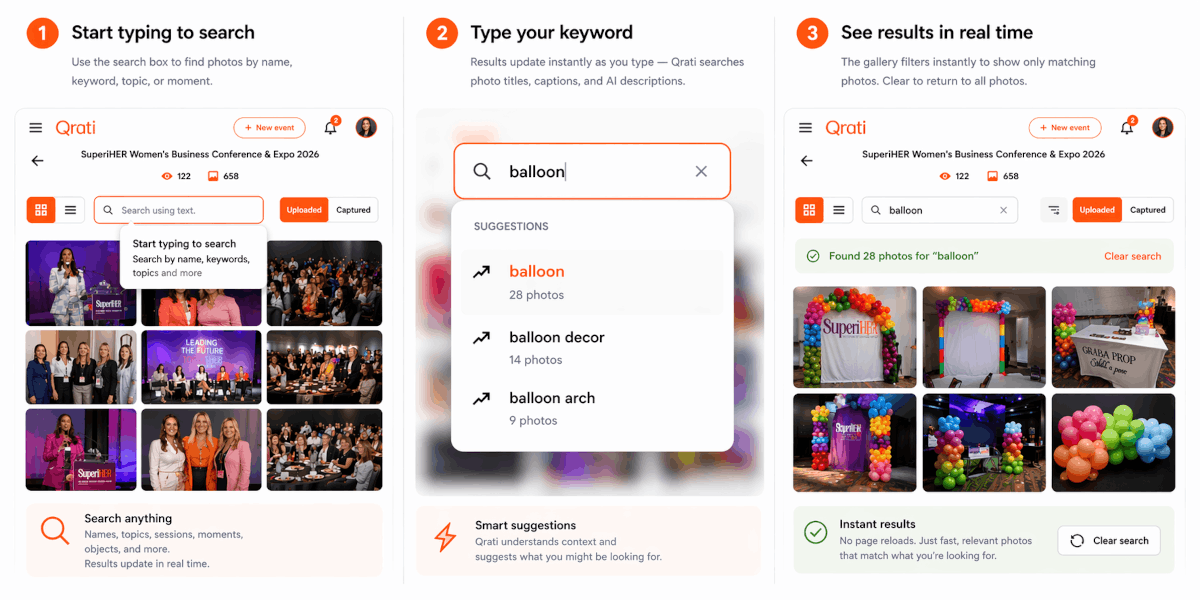
For event organizers and photographers curating a gallery, text search is especially powerful. You can quickly pull together a subset of photos around a specific theme or moment without touching a single filter dropdown.
Use text search to narrow the gallery down to a specific moment or session, then use face search to find a specific person within those results. Between the two, there isn’t a photo at your event that can’t be found.
And None of This Costs Extra. Not a Cent.
AI face search sounds like the kind of feature that lives behind a sales call and an “Enterprise” price tag. Every other platform that offers anything remotely like it charges more — sometimes significantly more — for the privilege.
Qrati includes all four search modes — face search, group search, one-tap tile search, and text search — in every plan, for every event, for every attendee.
No per-search fees. No face-count limits. No upgrade prompts. No “available on Business tier only” fine print. It just works — for your $500 birthday party and your 5,000-person corporate summit alike.
The moment you create a Qrati event and start uploading photos, every single one of these search capabilities is live for your attendees. There’s nothing to turn on.
What This Actually Means for Your Event

When guests can find their photos in seconds, something changes. They actually look at them. They share them. They post them. The conference recap shows up on LinkedIn from twelve different attendees. The marathon finish-line photo becomes an Instagram story. The team dinner candid gets forwarded in a group chat.
That’s the organic reach you hired a photographer to generate — and it only materializes when people can actually find what they’re looking for.
Qrati’s search system is designed around one idea: remove every possible reason a person might give up before finding their photos. The upload friction, the format compatibility, the multi-person problem, the “I don’t know where to start” problem — all of it, solved, built in, and free.
The photos are already there. Now it’s time for everyone to actually find them.
Everything you get with Qrati search — included, always
- AI face search — upload any photo from any device and find every image featuring that face
- Group search — one query image finds every person in it, individually and together
- One-tap tile search — click the face icon on any gallery photo to instantly filter by face
- Text & keyword search — find photos by names, captions, AI descriptions, and themes
- All formats supported: JPG, PNG, WEBP, HEIC, TIFF, BMP — auto-compressed for speed
- No app download, no account creation, no extra cost — ever